Features
All shift planner features at a glance
What ShiftPlanner can do, on which device – and what is part of Premium.
Shift calendar by month, week and year
Each shift type has a name, short code, times, break and a color. You enter shifts in the calendar with a tap – several per day, too, and with different times. Notes and your own events with an emoji sit right beside them.
- Month, week, year and list views
- “Fill month” and quick edit
- Categories work, vacation, sick, training and day off
- 3 shift types free, unlimited with Premium
- iPhone
- Android

Shift patterns and rotations
Set up your rhythm once as a rotation and roll it out for weeks or months. Days you changed by hand – after a shift swap, say – stay untouched when you roll the pattern out again.
- Templates: 2-2-2-2, 4 on / 4 off, continuous shifts, 2-2-3, DuPont, weekly rotating shifts, 5 on / 2 off
- Define your own rhythms freely
- 1 shift pattern free, unlimited with Premium
- iPhone
- Android

Alarms, reminders and rest time
You set a separate alarm for each shift type – earlier before the early shift, later before the late shift. On top come reminders before individual shifts, a reminder at the end of your workday and a warning when there is less rest between two shifts than you set (11 hours by default).
- iPhone
- Android

Hours, overtime and hourly wage
For free you see your hours and shifts per month. With Premium you get reports for the week, the year and custom date ranges, keep an overtime and vacation balance and have your gross pay estimated – with premiums for night, Sunday and holiday work.
The pay calculation is an estimate based on your input, without taxes and social security contributions. Your payslip is what counts.
- iPhone
- Android

PDF export, calendar and coworkers
With Premium you export a month or a year as a PDF to share or print, copy your shifts into the system calendar and share your schedule as a file with coworkers.
- iPhone
- Android

Apple Watch: shifts on your wrist
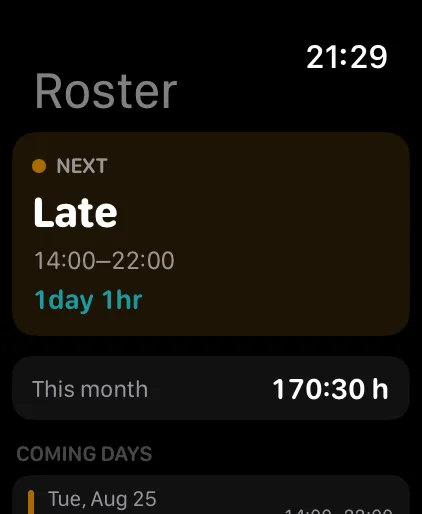
The watch app shows your next shift, the month and your hours. You add or remove a shift right on the watch, and the complication shows the next shift on your watch face.
- Apple Watch
Siri, Live Activity and iCloud
On iPhone you ask Siri about your next shift or your hours, add shifts by voice or call in sick. Before your shift, a Live Activity shows the countdown. With Premium, iCloud syncs your schedule through your private iCloud.
- iPhone
On Android: notification, app shortcuts, tablets
On Android, a notification shows the countdown to your shift, and app shortcuts take you straight to “Next shift”, “Add shift” and “Call in sick”. The app also runs on tablets and foldables.
- Android
What is available on which device?
iPhone, Apple Watch and Android compared. The Android app is coming soon.
| Feature | iPhone | Apple Watch | Android |
|---|---|---|---|
| View shift calendar | available | available | available |
| Add a shift | available | available | available |
| Roll out shift patterns | available | not available | available |
| Alarm per shift type | available | not available | available |
| Hours per month | available | available | available |
| Pay with premiums | with Premium | not available | with Premium |
| Week, year and custom reports | with Premium | not available | with Premium |
| PDF export | with Premium | not available | with Premium |
| Export to system calendar | with Premium | not available | with Premium |
| Share schedule with coworkers | with Premium | not available | with Premium |
| Next Shift widget | available | available | available |
| Countdown before your shift | available | not available | available |
| Siri | available | not available | not available |
| iCloud sync | with Premium | not available | not available |
| Tablet layout | not available | not available | available |
✓ available · ✓ᴾ with Premium · – not available
Ready for your next work schedule?
Download ShiftPlanner for free and enter your shift schedule in a few minutes.
 coming soonAndroid